


LinkedIn outreach that sounds like you, at a safe pace
Alltimer adds LinkedIn steps to your outbound sequences, visiting profiles, sending personalised connection notes, messages and InMail, and replies to inbound LinkedIn messages so no conversation sits unread.
14-day free trial · No credit card
Marcus Lee · VP Sales, Tallyfin
Marcus, congrats on the Series B. Noticed you’re hiring 6 AEs in Austin. Happy to share how other fintech teams ramp new reps faster.
Thanks. Ramp time is a real issue for us right now honestly
Most teams we work with get new AEs to first meeting in week one by having the agent run their early outreach. Worth 20 minutes next week to see it on your ICP?
Sure. Wednesday afternoon?
Wednesday 2:00 PM CT it is. Invite is on its way to your work email.
Meeting booked · Wed 2:00 PM CT
38%
average connection acceptance with personal notes
3x
more meetings when LinkedIn joins email sequences
45 min
of manual LinkedIn work saved per rep, per day
Agents on LinkedIn
How your AI team works LinkedIn.
Outbound agent
Warm up prospects before the first email
A profile visit and connection note on day one, email on day two, a message after they accept. Prospects recognise your name when the email lands.
Inbound agent
Never leave a LinkedIn lead on read
When a prospect messages you about your post or product, the agent answers questions, qualifies fit and books a meeting from your calendar.
Capabilities
Everything you need on LinkedIn.
Profile visits and connection notes
Visits the profile first, then sends a connection request with a short note based on their role, posts or company news.
Messages and InMail
Messages new connections in sequence, and uses InMail credits from Sales Navigator or Premium for prospects outside your network.
Safe daily limits
Conservative caps per account, gradual ramp-up for new accounts, working-hours sending and natural gaps between actions.
One sequence, every channel
LinkedIn steps sit alongside email, AI calls and SMS. A reply on any channel stops the rest of the sequence for that person.
Inbound LinkedIn replies
Messages from prospects, recruiters and customers land in the Alltimer inbox, sorted, with the agent replying to sales conversations.
Multiple seats, one view
Connect LinkedIn accounts for every rep or client and see all conversations, limits and results in one place.
The platform
The only AI customer agent platform your business needs.
Find leads, run outreach, answer every conversation and resolve support, with your CRM, inbox and agents in one app. On the web today, with iPhone and Android apps in private beta.
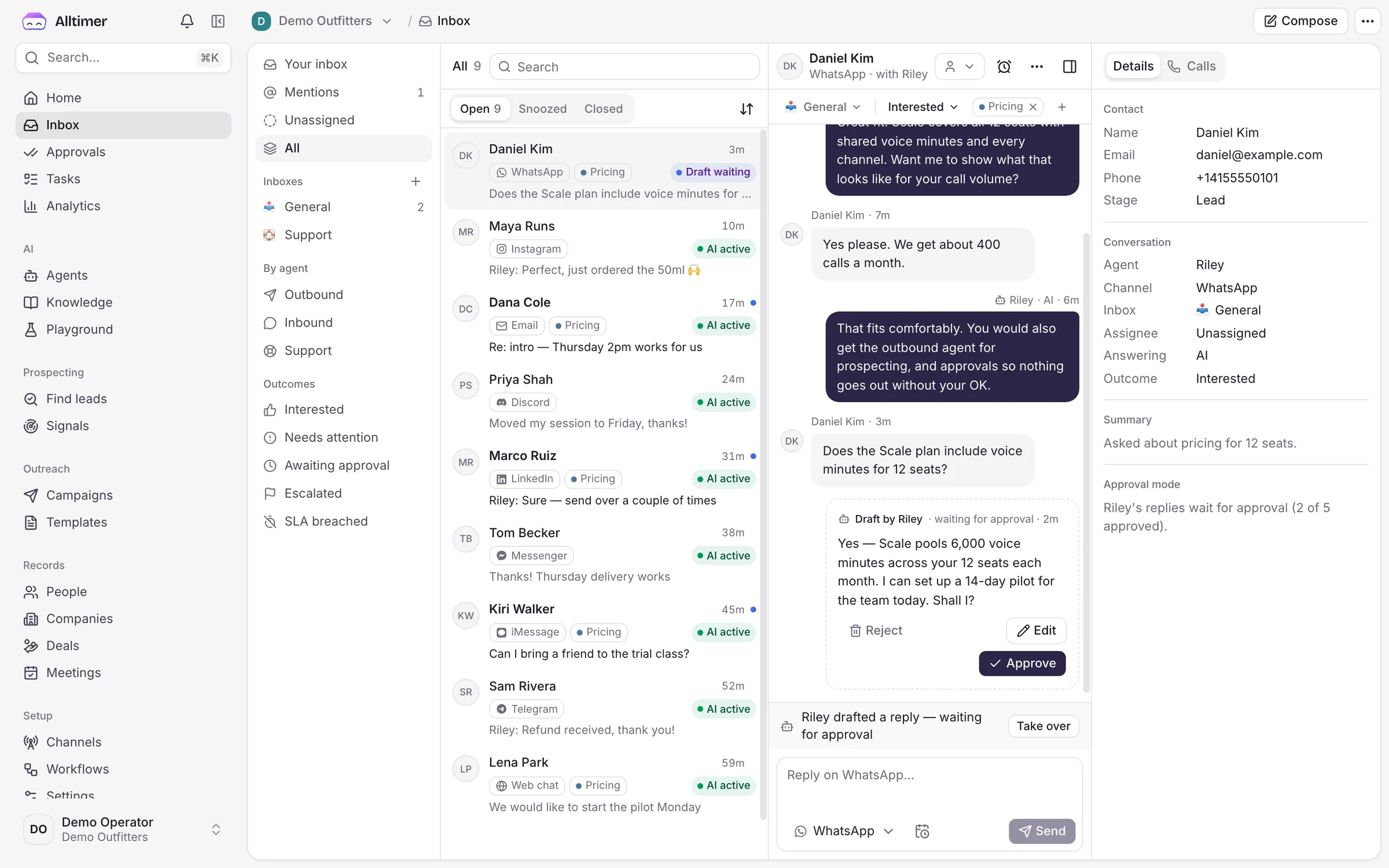
One inbox for everything
Every DM, call, email and LinkedIn reply in one place, with the agent’s work and your team’s side by side.
You stay in control
Approve drafts, set guardrails and take over any thread mid-conversation with full context.
CRM built in
People, companies, deals and meetings update themselves as agents work. Or sync to HubSpot and Salesforce.
Ready for agencies
Run every client in its own workspace under your brand, with reports and rebilling included.
Setup
Live on LinkedIn in minutes.
- 1
Connect your LinkedIn account
Connect your LinkedIn account in Alltimer. Your session runs on a dedicated, location-matched connection.
- 2
Set your limits
Start with recommended daily caps for connection requests, messages and visits. New accounts ramp up automatically over a few weeks.
- 3
Add LinkedIn steps to a sequence
Drop visit, connect, message or InMail steps into any sequence, review the AI drafts and launch.
Integrations
Plugs into the tools you already run on.
Agents read from and write to your store, calendar, CRM and helpdesk, so the work is done, not just discussed.
- HubSpot
- Salesforce
- Calendly
- Cal.com
- Google Calendar
- Slack
- Zapier
- Gmail
 Shopify
 Stripe
 Zendesk
- 100+via API & webhooks
Mobile apps · private beta
Run your business from your pocket.
Alltimer for iPhone and Android puts your whole AI team on your phone. See what every agent is doing, approve what matters and take over any conversation, wherever you are. Join the private beta for early access.
Every conversation, live
Watch your agents work across every channel and jump in with one tap.
Approve from anywhere
Discounts, refunds and first emails wait for your thumbs-up, not your laptop.
Know the moment it lands
Push alerts for booked meetings, closed sales and handoffs that need you.

Daniel Kim
Front Desk is replying…
Can we start the pilot on Monday?
Absolutely. I've set it up for Monday and sent the invite to your team.
Draft · 12% discount
Offer 12% off annual? Over your 10% limit.
FAQ
LinkedIn AI agent: FAQ
Will my LinkedIn account get restricted?
LinkedIn limits how much any account can do, and its user agreement restricts third-party automation. Alltimer keeps activity at a human pace: conservative daily caps, gradual ramp-up, working-hours sending and randomised gaps. You can also require approval on every message. Accounts kept within the defaults rarely see warnings.
How many connection requests can I send?
LinkedIn currently allows roughly 100 to 200 invitations a week depending on the account. Alltimer defaults to the lower end and tracks acceptance so you can raise it safely.
Do I need Sales Navigator?
No. Visits, connection requests and messages work on any account. InMail uses credits from Sales Navigator or Premium, and Sales Navigator searches can be imported as lists.
Can I use LinkedIn steps without email?
Yes. You can run LinkedIn-only sequences, but teams that combine LinkedIn with email and calls book about three times more meetings.
Related